UWdeVST
Concert
Steinway D · Bösendorfer Imperial · Yamaha CFX
Open chords, a singing line or a pop pulse. Shape touch and resonance around the space your composition needs.
From the first chord to the last chorus.
Eight synthesis models inspired by concert grands, character pianos and electric keyboards. Write a melody, open up a chorus or lay down the chords that hold the track together.
Sales pausedVST3 · Standalone · Windows / Linux x64
Explore the interface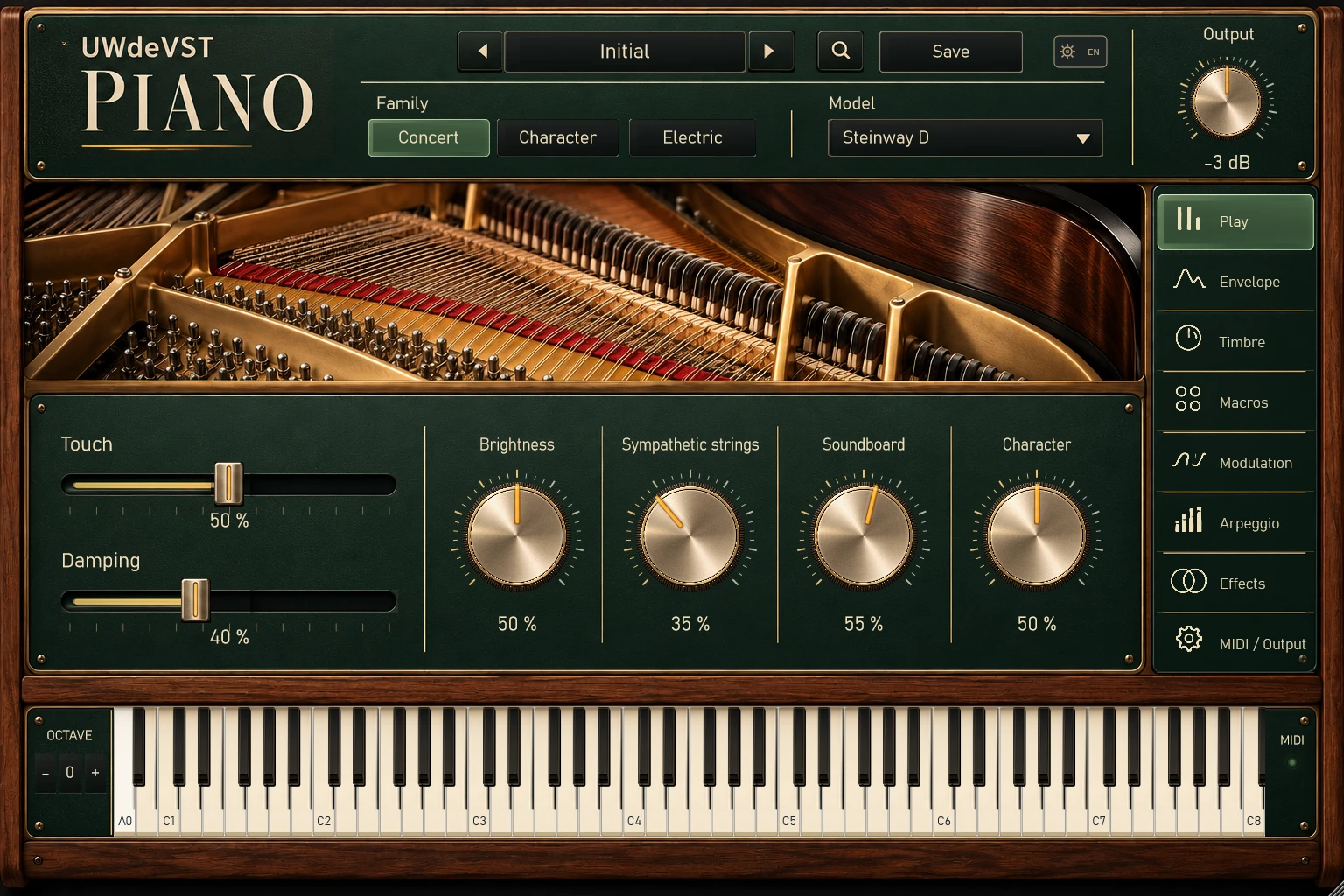
Steinway D · Bösendorfer Imperial · Yamaha CFX
Open chords, a singing line or a pop pulse. Shape touch and resonance around the space your composition needs.
Honky-tonk · Prepared Piano
Ragtime colour or a more percussive mechanism. Try an alternating bass, a short motif or an ostinato that answers the percussion.
Rhodes Mark I · Wurlitzer 200A · Clavinet D6
Extended chords for neo-soul, responses for broken beat and funk offbeats. Make the keyboard a partner to your rhythm section.
The audio engines have been reworked. The previous recordings have been removed while their replacements are prepared.
From the first note to the final treatments, explore five interface views and the purpose of their controls.
Space, colour and dynamics: choose the available effects around the role of the instrument.
Reverb and Delay can extend a cadence or open up an electric-piano passage. Keep the dry attack clear, and use the silences to hear the tails.
Try Saturation for a more pronounced texture or Chorus for movement, where available. Compare with the untreated sound at a similar level.
Transients, Compressor, Equalizer and Limiter help shape the final balance. Make these decisions while the other instruments are playing.
FORMATS & WORKFLOW
BEFORE YOU START
UWdeVST / RELEASE & DOWNLOADS
Current package · 1.0.2-20261101
Instrument updates are published regularly. Find the packages available to you in your library, and subscribe to update news if you wish.
Up to 32 voices · MIDI input · digital synthesis
| System / format | Size |
|---|---|
| Linux x64 · .deb | 21.9 MiB |
| Linux x64 · .tar.gz | 24.9 MiB |
| Windows x64 · ZIP | 40.5 MiB |
Intel(R) Core(TM) Ultra 7 265KF · 31.7 GiB RAM · Windows 11 26200.
| One voice, default setting | 0.081 ms / 5.33 ms |
|---|---|
| Selected stress setting · 32 voices | 2.299 ms / 5.33 ms |
| Heavy setting · 95th percentile | 2.77 ms |
| Host + instrument · peak RAM | 132.7 MiB |
Measured processing time per audio block in an offline VST3 host, after warm-up. Three 60-second renders per case; 128, 256 and 512-sample blocks. Exposed reverb, delay, chorus, flanger and phaser controls were toggled; other processing kept its preset settings. The stress setting was selected from the programs exposed to this host. These figures describe this configuration, not minimum requirements or guaranteed real-time DAW performance.
Linux installation and dependencies checked in a Debian container. Audio hardware and Linux DAWs were not tested.
Measurement details · 1 November 2026 ↗VST3 plug-in and standalone application. Windows packages include the Microsoft Visual C++ x64 runtime. Linux builds require glibc 2.36 / libstdc++ 12 and ALSA/X11 libraries. macOS is not available.
After payment is confirmed, your instrument appears in your account. Choose the archive for your system there.
A perpetual right to use the acquired instrument under licence v2.0. No mandatory subscription or paid renewal.
For instruments in a paid order on the official website, including promotional gifts, published updates to the same instrument are included at no extra charge while distributed. No release schedule or permanent online access is guaranteed. Separate expansions and content are not automatically included.
Licence v2.0 permits personal and professional musical use within the acquired offer. The publisher claims no ownership or royalty in your original compositions and recordings, subject to third-party rights. This does not authorise redistribution of the software.
Licence v2.0 does not set a numerical maximum on computers. It does not permit sharing the software or a licence between legally distinct people or entities. See section 3 of the full licence and the terms of the acquired offer.
The terms of sale provide a normal fourteen-day withdrawal period, with no waiver required for downloading. You can submit a request from your orders or the withdrawal form. The form does not issue automatic refunds.